Outpatient & Specialty Healthcare
Improve healthcare inventory visibility with Microsoft Dynamics 365
Bring barcode-enabled inventory execution closer to the facilities, stockrooms, receiving areas, and treatment-support locations where healthcare supplies actually move.
ScanWorkX extends Microsoft Dynamics 365 Supply Chain Management with guided mobile workflows for receiving, transfers, inventory movement, replenishment, counting, returns, and lot- or serial-controlled inventory where configured in D365.

Beyond the Central Warehouse
Follow inventory across the healthcare supply network
Healthcare inventory may leave a central distribution center long before its operational lifecycle is complete. Supplies can continue through facility receiving areas, local stockrooms, supply locations, and treatment-support areas before being consumed, returned, redirected, or replaced.
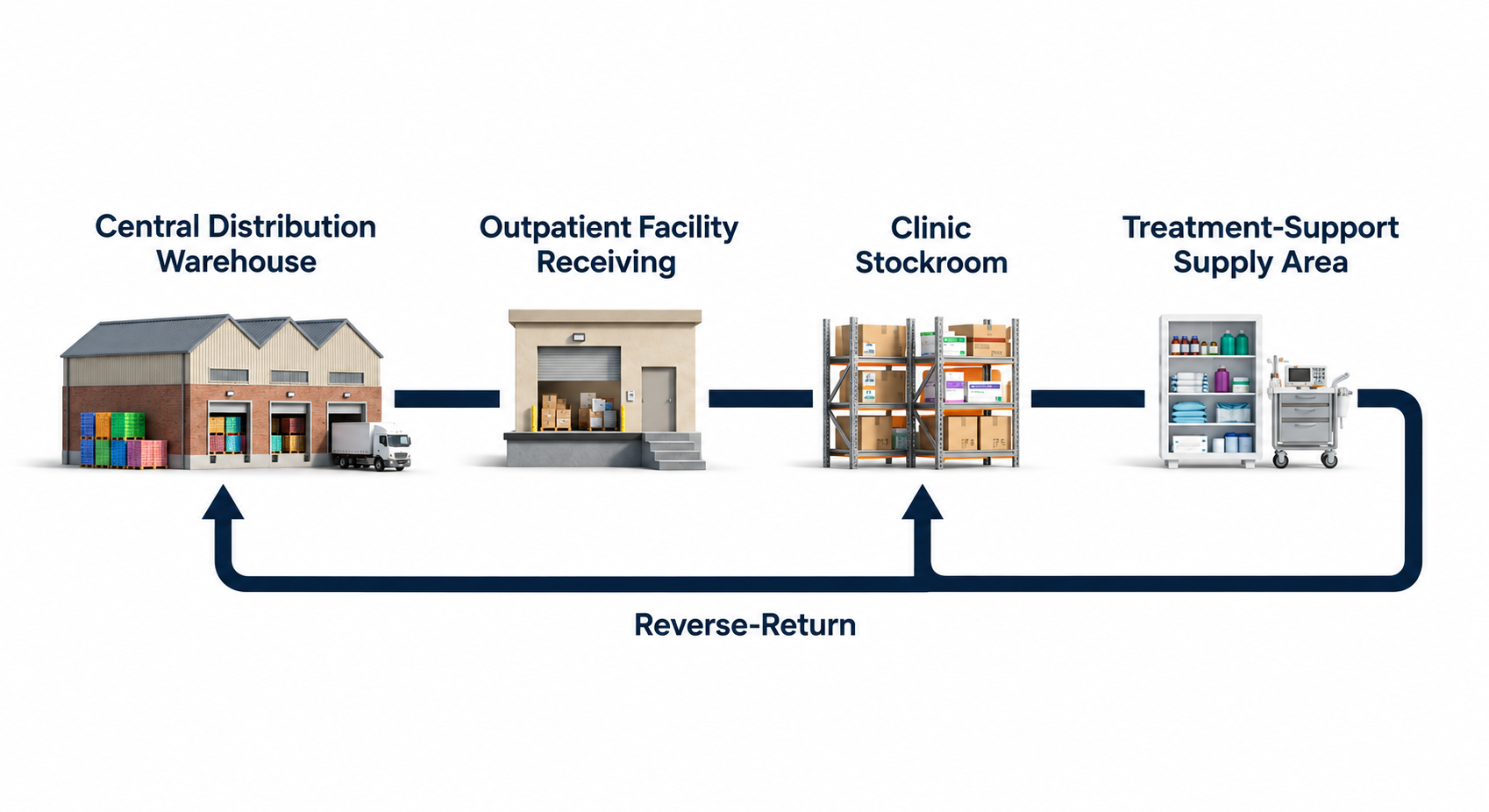
Central Distribution
The primary inventory hub where healthcare supplies may be consolidated before moving to regional or local facilities.
Facility Receiving
The local handoff point where purchased or transferred inventory enters an outpatient facility's inventory environment.
Clinic Stockroom
Local reserve inventory can be distributed across shelves, bins, storage rooms, and other designated supply locations.
Treatment-Support Area
Supplies may be positioned closer to the operational area where they are needed without making ScanWorkX part of clinical care.
Reverse Flow
Unused, excess, damaged, or redirected inventory can move back through the organization's approved supply-chain process.
Healthcare Segments
Different care environments create different inventory demands
Outpatient and specialty healthcare organizations share the need for dependable inventory information, but the products, storage environments, tracking requirements, and distribution models can vary significantly by segment.

Dialysis & Renal Care
Dialysis operations can involve recurring consumption of treatment-support supplies, equipment-related materials, drugs, biological products, and other inventory across multiple facilities. Local storage, frequent usage, and lot- or expiration-sensitive products can make dependable facility-level inventory information especially important.
Infusion & Oncology
Treatment-support inventory may include kits, devices, solutions, consumables, and other materials that must remain visible across controlled storage and supply locations.
Ambulatory Surgery
Procedure environments can manage sterile supplies, procedure kits, implants or serialized devices where applicable, and other inventory needed to support scheduled procedures.
Specialty Clinics
Distributed clinic networks often combine smaller local stockrooms with many facilities, creating a need for consistent inventory practices across participating locations.
Diagnostic & Laboratory
Laboratory and diagnostic operations may manage reagents, kits, consumables, supplies, and tracked materials across specialized storage and operating locations.
Healthcare Inventory Traceability
Build a clearer record of what inventory is and where it went
An on-hand quantity alone may not provide enough context for healthcare inventory research. Depending on the item and D365 configuration, the operational record can also include the product, lot or batch, serial information, quantity, location, and the transaction associated with the inventory.
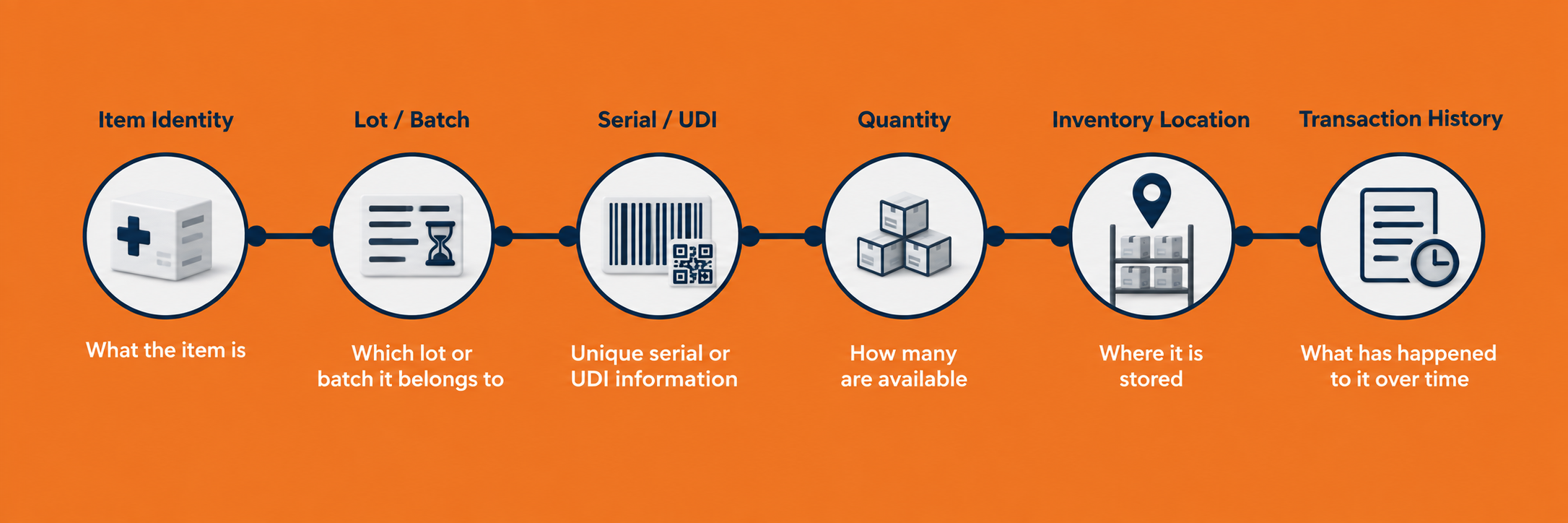
What product is it?
Barcode identification can help associate physical inventory with the appropriate item information used by the configured D365 process.
Which tracked inventory?
Lot, batch, serial, or applicable UDI barcode data can add specific identity to tracked inventory where the solution is configured to capture it.
Where is it now?
Location and quantity information help inventory teams understand what remains available at a warehouse, facility, stockroom, or other configured inventory location.
What happened to it?
Transaction history provides operational context for researching how tracked inventory changed location, quantity, or status over time.
Better data can support product investigations
More dependable item, tracking, location, quantity, and movement information in D365 can help inventory teams research affected stock during a product investigation or recall. ScanWorkX does not determine recall scope, regulatory obligations, patient exposure, or clinical action.
Healthcare Technology Architecture
Extend D365 without replacing the systems around it
ScanWorkX fits into the healthcare technology environment as the mobile execution layer for supported Microsoft Dynamics 365 inventory and supply-chain transactions. It does not create a replacement for the ERP or take over the responsibilities of clinical, pharmacy, quality, or regulatory systems.
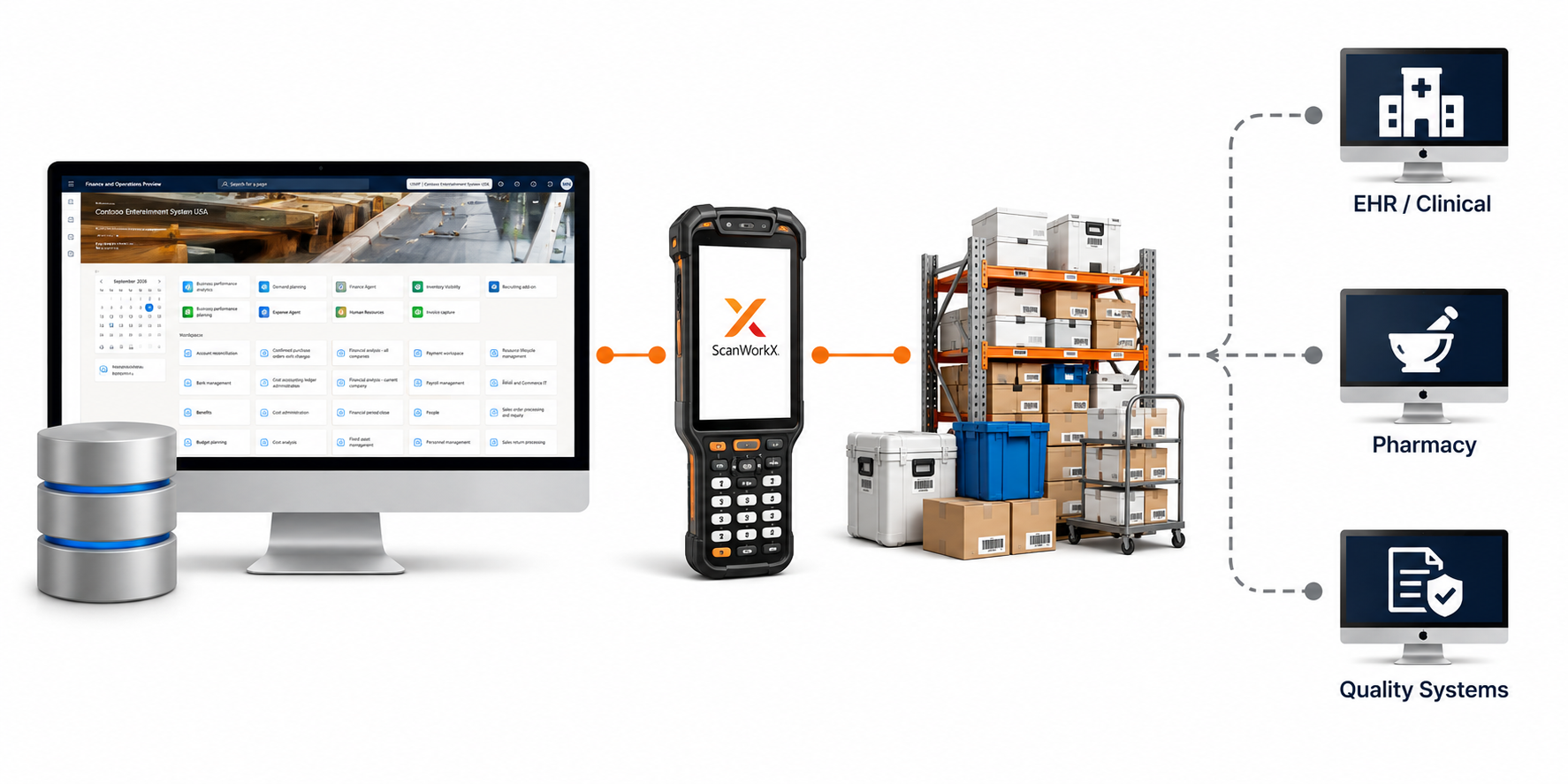
Dynamics 365 SCM
Remains the enterprise inventory and supply-chain system of record for items, inventory, warehouses, locations, purchase orders, transfer orders, tracking dimensions, and related business data.
ScanWorkX
Provides the mobile execution experience, including scan sequences, barcode interpretation, configured prompts, validations, defaults, messages, and supported transaction guidance.
Healthcare Systems
EHR, clinical, pharmacy, quality, regulatory, and other specialized applications continue to manage patient care, clinical records, medication-specific functions, and controlled healthcare processes.
Match the mobile workflow to the D365 design
A central distribution operation may use more structured or advanced warehouse processes while a smaller outpatient facility may use simpler inventory processes. ScanWorkX should be configured around the Dynamics 365 functionality enabled for the specific location and approved business process rather than assuming every facility operates the same way.